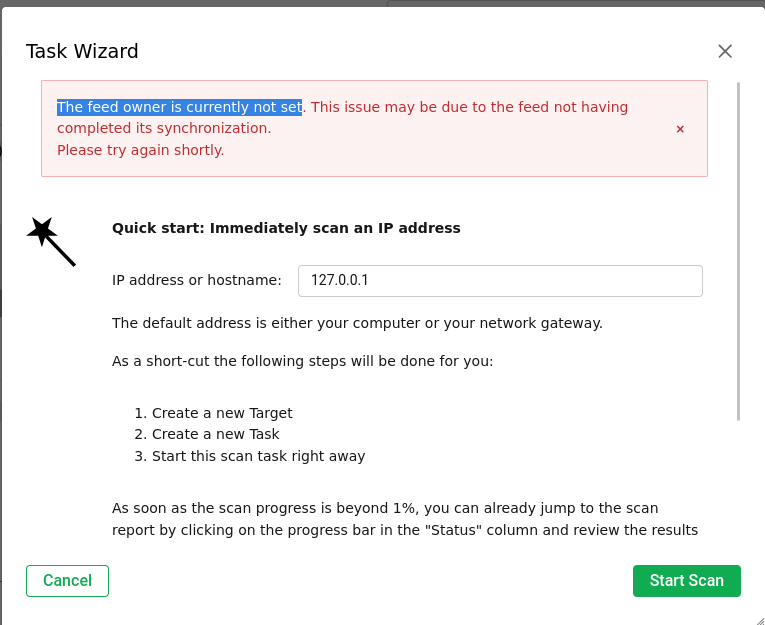
@frank123 How did you installed it. sounds like installed incorrectly? If compiling by source, then follow the instructions or install kali packages.
Eero
Unfortunately I am facing the same problem right now. I have a Kali system running as VM on Proxmox and installed OpenVAS (as described in this guide), waited for the feed status to switch to Current for all of the available feeds.
Afterwards I wanted to start my first scan an received the same message. The gvm-check-setup script gives me for everything an OK, also I don’t see anything problematic in the log files.
With this limited background information, it’s impossible to guess the cause at all; the installation works well on Kali Linux — I’ve done it dozens of times over the past week. It’s worth checking that the machine has enough memory (at least 8GB), sufficient disk space (minimum 60GB), and enough processing power.
Eero
@Eero thanks for the information about the resources. I gave my Kali machine only about 6GB RAM, 6 cores and 80GB disk space. What I ended up doing is running this container which worked fine for the tests I needed to conduct. The machine the container is running on has 10GB RAM, 4 cores and 100GB disk space. Maybe you are right and the bottleneck is the RAM - I would have to check on that.
@DrStrangelove Not sure, but think that less than 8G is not enough for feedsync. Your issue looks like feedsync is not completed. (crash or incomplete due to ram issues).
Anyway, for scanning 10G is still very low amount of memory nowadays.
Eero
The entire time the hdd space within the guest OS did not fluctuate outside of normal range and consistently held at 23GB of free space at each point of the process (until…of course…I crashed the host OS):
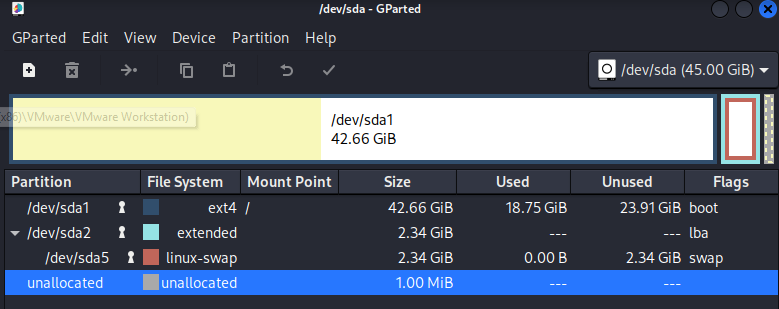
Due to limitations for a new user I’m going to have to submit several posts…one per screenshot. This is the hdd space of the host OS after about an hour of synchronizing. The process never completed as it crashed the host operating system after it filled completely. Please note: the guest OS (Kali) never filled beyond 26 GB total. It was the host OS that suffered and crashed.
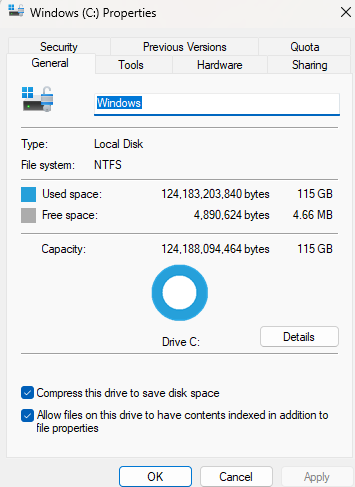
I spent yesterday troubleshooting this issue and trying to figure out what the problem is. In my test case I used a Windows 11 host with the current version of Kali over VM Ware Workstation 17. The host started with 15GB of free space on a 115GB total hdd size. The guest had 50GB total size. I installed GVM all the way to the point after populating the /var/lib/gvm directories with CERT , SCAP, and NVT signatures. When I logged into GVM for the first time and went to feed status or to start a scan…I noticed it was still synchronizing and showing the error message we have all been getting. A little while later the hard drive on the host system was filled and crashing both systems, but the guest operating system was still only 1/2 full (at around 25GB in size). This is host hdd space after installing GVM and synchronizing SCAP/CERT/NVT:
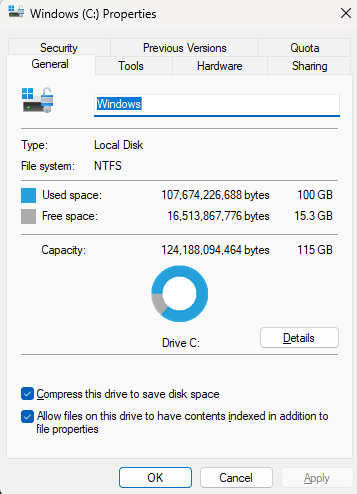
I’m getting the same problem. I’ve been using GVM for years, always set it up the same way (in Kali with outlined steps and resources), and I’ve never had this issue before. I’m going to re-install GVM but this is a new issues all the way around.
(quick moderator note, some of the posts here are in reverse order (7-10) as a side-effect from the approval queue, I’ll try to fix that up later today).
(edit- leaving it as-is to not break the thread)
There should be around 60–80GB of disk space available, including the OS installation, preferably more. Memory must be at least 16GB. After feedsync, the NVT data is transferred to the database, which can take hours depending on various factors such as machine and disk speed. Scanning will not function until the NVT data is present in the database.
Eero
Anticipating that might be the answer, I did the same experiment with another system with 500 GB HDD Space and 16 GB of memory, and got similar results. However, the hard drive didn’t fill up quite as obviously as this one did. In the second case, the VM quite working, wouldn’t finish its task, and had to be restored to a previous snapshot, and the host operating system was restarted. I have run GVM & Kali on the same laptop as the one from the screenshots for previous versions and there wasn’t an issue. I still believe something has changed that is requiring more resources than before.
It’s worth allocating sufficient resources, as memory and disk space are cheap. I rarely run a GVM on a machine with less than 20 GB of RAM. It’s also good to have enough CPU cores. If you’re using VirtualBox on Windows, make sure to update the drivers and software to the latest versions
It’s always recommended to use an SSD, as its performance is significantly better compared to a mechanical HDD.
Eero
As far as I understand this thread this is about Kali and not our product. So I am moving the thread into a different category.
1 Like
@bricks, you may be right about it not being a GVM issue…but it seems that way at this point. I followed @eero advice and did a fresh install on a laptop with more than enough resources to facilitate an update and a scan…also a fresh install of Kali. The update did complete in a timely manner as I have experienced in the past; however, when I tried creating new tasks they would disappear from view without giving me the option to start a scan. I finally used the Scan Wizard and the tasks did appear in the drop-down menu during setup…but the results of starting the scan were the same. The feed was still up-to-date and current when I did this test.
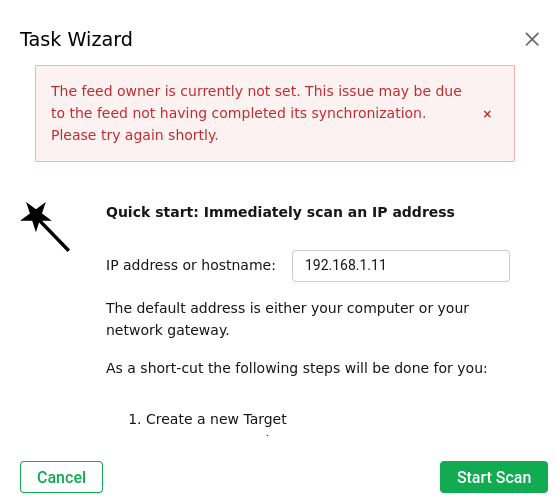
I’m afraid I’m going to have to post my screenshots one at a time again, as I am being halted from posting more than one at this time.
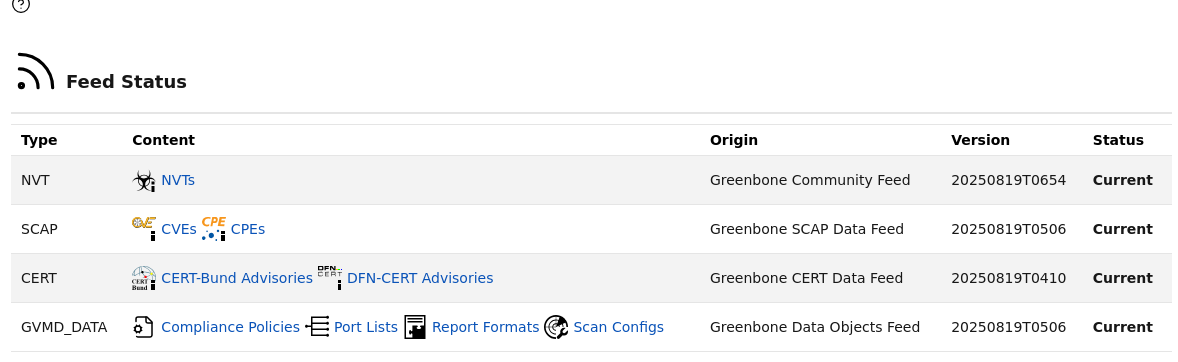
Kali installation has always worked for me, and I install it a couple of times a month. Try setting the feed owner manually according to the instructions, or test this script on Debian 12: GitHub - Kastervo/OpenVAS-Installation: A secure, automated script to install and configure OpenVAS (Greenbone Community Edition) from source on Debian 12. Features GPG verification, self-signed SSL, and systemd integration.
Eero
(side note, not part of the main discussion)
Hi @damiano the next time you post screenshots you should be able to do more than one in the same post, if not please let me know. Thanks!
This topic was automatically closed after 90 days. New replies are no longer allowed.