I am a complete beginner with OpenVAS/GVM, so I may be missing something obvious.
I am running OpenVAS on Linux inside Oracle VM.
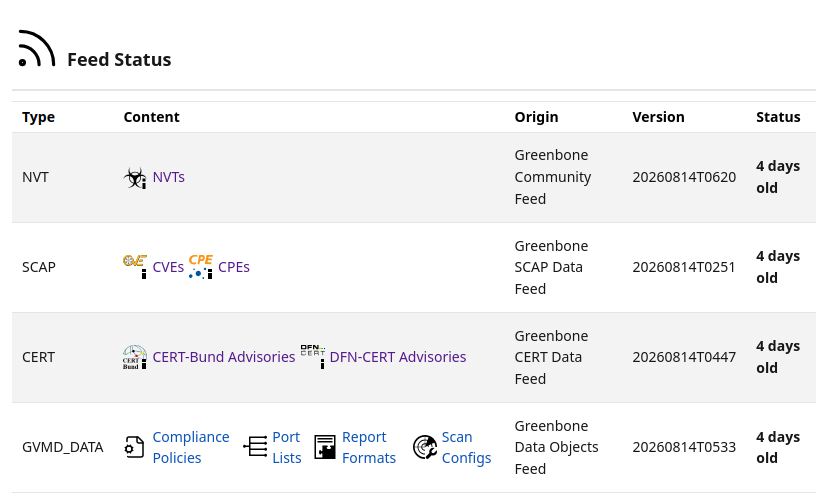
The SCAP data download has been running for about two months, but it still has not completed.
On the web interface, the status shows as “Current”, but when I run a CPE scan, it looks like nothing is being scanned.
I am not sure whether this is normal or if something is wrong with my setup.
Could anyone tell me how to check whether the SCAP data is actually downloaded correctly, or how to fix this issue?
At first glance, I might guess that your “Oracle VM” is very under resourced. Using a VM with 16GB of RAM and 4 CPU cores the initial feed synchronization took ~1 hour - same for each install method.
Thank you for the information. In my case, the VM was configured with 8 GB of RAM and 8 CPU cores. However, the host machine has 16 GB of RAM, and memory usage reaches around 98% while the VM is running.
Based on this, is it correct to understand that the VM is resource-constrained on this machine, which is why the initial feed synchronization is taking so long?
You can see the community docs minimum and recommended resources. AFAIK these are given for bare-metal installation, and running within a virtualized environment may degrade the efficiency of these resources. In my experience, more CPU and RAM will certainly provide more performance, and perhaps the recommended resources should be increased.
However, even with your stated 8GB or RAM in a virtualization environment, it should not take that much time. But, I cannot speak to your network conditions.
Currently, I am setting up the environment on Ubuntu running in a virtual machine. For the network adapter, I selected “Bridged Adapter” in the VM settings, and the VM connects to the Internet through my router.
The theoretical maximum speed of my network connection is 100 Mbps, and the usual download speed is approximately 30–60 Mbps.
When I inspected the packets with Wireshark, I observed the following TCP-related events while rsync was running:
TCP Retransmission
Window is full
Zero Window
I am not sure whether these events are related to the SCAP data synchronization, but rsync sometimes stops approximately 10 seconds after it starts.
Since I could not find a way to prevent this issue, I created a script that reruns rsync at approximately 10-minute intervals in order to continue the process. As a result, the SCAP data synchronization took a very long time to complete.
Based on information I found on the Internet, I suspected that the MTU value might be the cause. I tried changing it to several different values, but the situation did not improve.
Why does this issue not occur in other users’ environments?
I would also appreciate your opinions on the following points:
Is it possible that setting up the environment on Ubuntu running in a virtual machine is causing this issue?
Would installing Ubuntu directly on the PC in a bare-metal environment, using a separate disk partition, provide more stable operation?
What causes TCP Retransmission, Window is full, and Zero Window, and what settings or troubleshooting steps should I check?
If anyone has successfully completed SCAP data synchronization in a similar environment, I would appreciate it if you could share your system configuration and relevant settings.