@LittleDay please paste of dmesg output after export
Eero
@LittleDay please paste of dmesg output after export
Eero
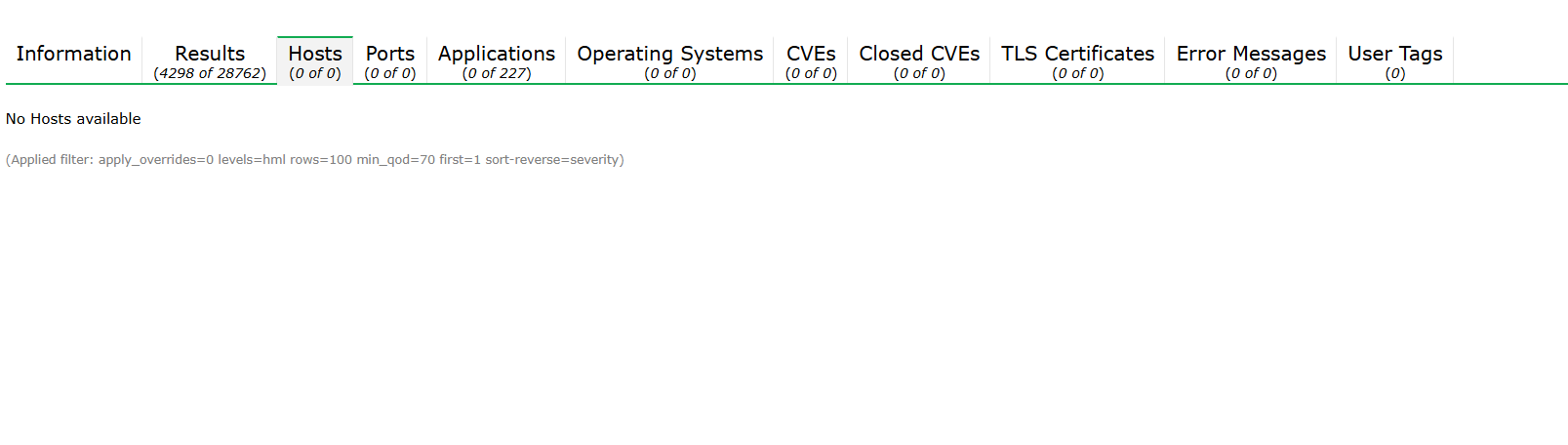
I noticed one thing also, that except “Results” page nothing loading in GVM, I waited also might it need time to load, but it’s still empty:
in dmesg nothing is adding after trying to export, take a look:
[ 1.975618] scsi 32:0:0:0: Direct-Access VMware Virtual disk 1.0 PQ: 0 ANSI: 2
[ 1.998957] scsi target32:0:0: Beginning Domain Validation
[ 2.000536] scsi target32:0:0: Domain Validation skipping write tests
[ 2.000544] scsi target32:0:0: Ending Domain Validation
[ 2.000705] scsi target32:0:0: FAST-40 WIDE SCSI 80.0 MB/s ST (25 ns, offset 127)
[ 2.003179] usb 1-2: new full-speed USB device number 3 using uhci_hcd
[ 2.037769] sd 32:0:0:0: [sda] 1048576000 512-byte logical blocks: (537 GB/500 GiB)
[ 2.037815] sd 32:0:0:0: [sda] Write Protect is off
[ 2.037820] sd 32:0:0:0: [sda] Mode Sense: 6d 00 00 00
[ 2.037888] sd 32:0:0:0: [sda] Write cache: disabled, read cache: disabled, doesn’t support DPO or FUA
[ 2.040604] sda: sda1
[ 2.040854] sd 32:0:0:0: [sda] Attached SCSI disk
[ 2.165517] usb 1-2: New USB device found, idVendor=0e0f, idProduct=0002, bcdDevice= 1.00
[ 2.165523] usb 1-2: New USB device strings: Mfr=1, Product=2, SerialNumber=0
[ 2.165525] usb 1-2: Product: VMware Virtual USB Hub
[ 2.165527] usb 1-2: Manufacturer: VMware, Inc.
[ 2.173942] hub 1-2:1.0: USB hub found
[ 2.177043] hub 1-2:1.0: 7 ports detected
[ 4.083988] EXT4-fs (sda1): mounted filesystem with ordered data mode. Quota mode: none.
[ 4.459942] Not activating Mandatory Access Control as /sbin/tomoyo-init does not exist.
[ 6.685710] systemd[1]: Inserted module ‘autofs4’
[ 6.925583] systemd[1]: systemd 257.2-1 running in system mode (+PAM +AUDIT +SELINUX +APPARMOR +IMA +IPE +SMACK +SECCOMP +GCRYPT -GNUTLS +OPENSSL +ACL +BLKID +CURL +ELFUTILS +FIDO2 +IDN2 -IDN +IPTC +KMOD +LIBCRYPTSETUP +LIBCRYPTSETUP_PLUGINS +LIBFDISK +PCRE2 +PWQUALITY +P11KIT +QRENCODE +TPM2 +BZIP2 +LZ4 +XZ +ZLIB +ZSTD +BPF_FRAMEWORK +BTF -XKBCOMMON -UTMP +SYSVINIT +LIBARCHIVE)
[ 6.925593] systemd[1]: Detected virtualization vmware.
[ 6.925615] systemd[1]: Detected architecture x86-64.
[ 6.969747] systemd[1]: Hostname set to .
[ 7.607170] systemd[1]: bpf-restrict-fs: LSM BPF program attached
[ 7.745753] systemd-sysv-generator[388]: SysV service ‘/etc/init.d/speech-dispatcher’ lacks a native systemd unit file, automatically generating a unit file for compatibility.
[ 7.745763] systemd-sysv-generator[388]: Please update package to include a native systemd unit file.
[ 7.745768] systemd-sysv-generator[388]: ! This compatibility logic is deprecated, expect removal soon. !
[ 7.778202] vmw_vmci 0000:00:07.7: Using capabilities 0xc
[ 7.779641] Guest personality initialized and is active
[ 7.779806] VMCI host device registered (name=vmci, major=10, minor=124)
[ 7.779810] Initialized host personality
[ 7.793028] NET: Registered PF_VSOCK protocol family
[ 7.822527] systemd-sysv-generator[388]: SysV service ‘/etc/init.d/exim4’ lacks a native systemd unit file, automatically generating a unit file for compatibility.
[ 7.822540] systemd-sysv-generator[388]: Please update package to include a native systemd unit file.
[ 7.822547] systemd-sysv-generator[388]: ! This compatibility logic is deprecated, expect removal soon. !
[ 9.220413] systemd[1]: Queued start job for default target multi-user.target.
[ 9.261194] systemd[1]: Created slice system-getty.slice - Slice /system/getty.
[ 9.261893] systemd[1]: Created slice system-modprobe.slice - Slice /system/modprobe.
[ 9.262330] systemd[1]: Created slice user.slice - User and Session Slice.
[ 9.262432] systemd[1]: Started systemd-ask-password-wall.path - Forward Password Requests to Wall Directory Watch.
[ 9.262727] systemd[1]: Set up automount proc-sys-fs-binfmt_misc.automount - Arbitrary Executable File Formats File System Automount Point.
[ 9.262764] systemd[1]: Reached target integritysetup.target - Local Integrity Protected Volumes.
[ 9.262801] systemd[1]: Reached target remote-fs.target - Remote File Systems.
[ 9.262819] systemd[1]: Reached target slices.target - Slice Units.
[ 9.262863] systemd[1]: Reached target veritysetup.target - Local Verity Protected Volumes.
[ 9.264340] systemd[1]: Listening on systemd-creds.socket - Credential Encryption/Decryption.
[ 9.264456] systemd[1]: Listening on systemd-initctl.socket - initctl Compatibility Named Pipe.
[ 9.264585] systemd[1]: Listening on systemd-journald-dev-log.socket - Journal Socket (/dev/log).
[ 9.264722] systemd[1]: Listening on systemd-journald.socket - Journal Sockets.
[ 9.264762] systemd[1]: systemd-pcrextend.socket - TPM PCR Measurements was skipped because of an unmet condition check (ConditionSecurity=measured-uki).
[ 9.264782] systemd[1]: systemd-pcrlock.socket - Make TPM PCR Policy was skipped because of an unmet condition check (ConditionSecurity=measured-uki).
[ 9.264884] systemd[1]: Listening on systemd-udevd-control.socket - udev Control Socket.
[ 9.264954] systemd[1]: Listening on systemd-udevd-kernel.socket - udev Kernel Socket.
[ 9.271453] systemd[1]: Mounting dev-hugepages.mount - Huge Pages File System…
[ 9.272852] systemd[1]: Mounting dev-mqueue.mount - POSIX Message Queue File System…
[ 9.274191] systemd[1]: Mounting run-lock.mount - Legacy Locks Directory /run/lock…
[ 9.275375] systemd[1]: Mounting sys-kernel-debug.mount - Kernel Debug File System…
[ 9.276543] systemd[1]: Mounting sys-kernel-tracing.mount - Kernel Trace File System…
[ 9.279391] systemd[1]: Starting keyboard-setup.service - Set the console keyboard layout…
[ 9.281568] systemd[1]: Starting kmod-static-nodes.service - Create List of Static Device Nodes…
[ 9.283044] systemd[1]: Starting modprobe@configfs.service - Load Kernel Module configfs…
[ 9.284358] systemd[1]: Starting modprobe@drm.service - Load Kernel Module drm…
[ 9.285782] systemd[1]: Starting modprobe@efi_pstore.service - Load Kernel Module efi_pstore…
[ 9.287200] systemd[1]: Starting modprobe@fuse.service - Load Kernel Module fuse…
[ 9.287321] systemd[1]: systemd-fsck-root.service - File System Check on Root Device was skipped because of an unmet condition check (ConditionPathExists=!/run/initramfs/fsck-root).
[ 9.287367] systemd[1]: systemd-hibernate-clear.service - Clear Stale Hibernate Storage Info was skipped because of an unmet condition check (ConditionPathExists=/sys/firmware/efi/efivars/HibernateLocation-8cf2644b-4b0b-428f-9387-6d876050dc67).
[ 9.289775] systemd[1]: Starting systemd-journald.service - Journal Service…
[ 9.316037] systemd[1]: Starting systemd-modules-load.service - Load Kernel Modules…
[ 9.316083] systemd[1]: systemd-pcrmachine.service - TPM PCR Machine ID Measurement was skipped because of an unmet condition check (ConditionSecurity=measured-uki).
[ 9.317237] systemd[1]: Starting systemd-remount-fs.service - Remount Root and Kernel File Systems…
[ 9.317284] systemd[1]: systemd-tpm2-setup-early.service - Early TPM SRK Setup was skipped because of an unmet condition check (ConditionSecurity=measured-uki).
[ 9.318181] systemd[1]: Starting systemd-udev-load-credentials.service - Load udev Rules from Credentials…
[ 9.319249] systemd[1]: Starting systemd-udev-trigger.service - Coldplug All udev Devices…
[ 9.321031] systemd[1]: Mounted dev-hugepages.mount - Huge Pages File System.
[ 9.321156] systemd[1]: Mounted dev-mqueue.mount - POSIX Message Queue File System.
[ 9.321249] systemd[1]: Mounted run-lock.mount - Legacy Locks Directory /run/lock.
[ 9.321336] systemd[1]: Mounted sys-kernel-debug.mount - Kernel Debug File System.
[ 9.321427] systemd[1]: Mounted sys-kernel-tracing.mount - Kernel Trace File System.
[ 9.343325] systemd[1]: Finished kmod-static-nodes.service - Create List of Static Device Nodes.
[ 9.344583] systemd[1]: modprobe@configfs.service: Deactivated successfully.
[ 9.366262] fuse: init (API version 7.38)
[ 9.375482] systemd[1]: Finished modprobe@configfs.service - Load Kernel Module configfs.
[ 9.376189] systemd[1]: modprobe@drm.service: Deactivated successfully.
[ 9.384545] systemd-journald[411]: Collecting audit messages is disabled.
[ 9.389393] EXT4-fs (sda1): re-mounted. Quota mode: none.
[ 9.395304] systemd[1]: Finished modprobe@drm.service - Load Kernel Module drm.
[ 9.396824] systemd[1]: modprobe@efi_pstore.service: Deactivated successfully.
[ 9.415535] systemd[1]: Finished modprobe@efi_pstore.service - Load Kernel Module efi_pstore.
[ 9.416542] systemd[1]: modprobe@fuse.service: Deactivated successfully.
[ 9.463524] systemd[1]: Finished modprobe@fuse.service - Load Kernel Module fuse.
[ 9.479429] systemd[1]: Finished systemd-modules-load.service - Load Kernel Modules.
[ 9.511759] systemd[1]: Finished systemd-remount-fs.service - Remount Root and Kernel File Systems.
[ 9.559640] systemd[1]: Finished systemd-udev-load-credentials.service - Load udev Rules from Credentials.
[ 9.575374] systemd[1]: Finished keyboard-setup.service - Set the console keyboard layout.
[ 9.575662] systemd[1]: Started systemd-journald.service - Journal Service.
[ 9.694889] systemd-journald[411]: Received client request to flush runtime journal.
[ 9.700268] Adding 4194300k swap on /swapfile. Priority:-2 extents:64 across:231981056k FS
[ 11.286078] audit: type=1400 audit(1753455461.859:2): apparmor=“STATUS” operation=“profile_load” profile=“unconfined” name=“lsb_release” pid=498 comm=“apparmor_parser”
[ 11.286770] audit: type=1400 audit(1753455461.859:3): apparmor=“STATUS” operation=“profile_load” profile=“unconfined” name=“nvidia_modprobe” pid=499 comm=“apparmor_parser”
[ 11.286773] audit: type=1400 audit(1753455461.859:4): apparmor=“STATUS” operation=“profile_load” profile=“unconfined” name=“nvidia_modprobe//kmod” pid=499 comm=“apparmor_parser”
[ 11.291285] audit: type=1400 audit(1753455461.867:5): apparmor=“STATUS” operation=“profile_load” profile=“unconfined” name=“/usr/bin/man” pid=501 comm=“apparmor_parser”
[ 11.291290] audit: type=1400 audit(1753455461.867:6): apparmor=“STATUS” operation=“profile_load” profile=“unconfined” name=“man_filter” pid=501 comm=“apparmor_parser”
[ 11.291292] audit: type=1400 audit(1753455461.867:7): apparmor=“STATUS” operation=“profile_load” profile=“unconfined” name=“man_groff” pid=501 comm=“apparmor_parser”
[ 11.306969] audit: type=1400 audit(1753455461.883:8): apparmor=“STATUS” operation=“profile_load” profile=“unconfined” name=“/usr/sbin/cups-browsed” pid=502 comm=“apparmor_parser”
[ 11.307026] audit: type=1400 audit(1753455461.883:9): apparmor=“STATUS” operation=“profile_load” profile=“unconfined” name=“/usr/lib/x86_64-linux-gnu/lightdm/lightdm-guest-session” pid=497 comm=“apparmor_parser”
[ 11.307030] audit: type=1400 audit(1753455461.883:10): apparmor=“STATUS” operation=“profile_load” profile=“unconfined” name=“/usr/lib/x86_64-linux-gnu/lightdm/lightdm-guest-session//chromium” pid=497 comm=“apparmor_parser”
[ 11.309112] audit: type=1400 audit(1753455461.883:11): apparmor=“STATUS” operation=“profile_load” profile=“unconfined” name=“/usr/lib/NetworkManager/nm-dhcp-client.action” pid=500 comm=“apparmor_parser”
[ 11.499713] sd 32:0:0:0: Attached scsi generic sg0 type 0
[ 11.500832] ACPI: AC: AC Adapter [ACAD] (on-line)
[ 11.639507] input: PC Speaker as /devices/platform/pcspkr/input/input7
[ 11.667384] RAPL PMU: API unit is 2^-32 Joules, 0 fixed counters, 10737418240 ms ovfl timer
[ 11.685061] cryptd: max_cpu_qlen set to 1000
[ 11.760718] AVX2 version of gcm_enc/dec engaged.
[ 11.760881] AES CTR mode by8 optimization enabled
[ 18.799650] e1000: ens33 NIC Link is Up 1000 Mbps Full Duplex, Flow Control: None
[ 18.799746] IPv6: ADDRCONF(NETDEV_CHANGE): ens33: link becomes ready
[ 21.048712] NET: Registered PF_QIPCRTR protocol family
[12188.283878] mptscsih: ioc0: attempting task abort! (sc=0000000043405f65)
[12188.283891] sd 32:0:0:0: [sda] tag#76 CDB: Write(10) 2a 00 1f 05 2a f0 00 00 10 00
[12188.651823] mptscsih: ioc0: task abort: SUCCESS (rv=2002) (sc=0000000043405f65)
[235373.008429] mptscsih: ioc0: attempting task abort! (sc=00000000d5e4489f)
[235373.008446] sd 32:0:0:0: [sda] tag#54 CDB: Write(10) 2a 00 1c 1e c0 c0 00 00 30 00
[235373.376408] mptscsih: ioc0: task abort: SUCCESS (rv=2002) (sc=00000000d5e4489f)
@LittleDay last messages looks like some issues on your hard disk
Eero
@LittleDay is this physical or virtual machine? what kind of storage its using?
Eero
@Eero It’s a VM and HDD
Filesystem Type Size Used Avail Use% Mounted on
/dev/sda1 ext4 492G 25G 442G 6% /
To be honestly it’s not a machine issue, that GVM side that can’t load and export scan result.
When scan result was 24k with 8G memory, it’s exporting
When scan result was 28k with 32GB memory, still have an export issue.
Let’s say if export will work on 64GB or 128GB it’s definitely anomaly in my mind.
Briefly I want an answer, can I export this scan result somehow?
@LittleDay large datasets usually eats memory while its processes and that is normal.
All my scanning machines are physical and with more memory.
Cannot answer your question since cannot repeat the issue.
Try that debian installation since it contains newer version of gvm.
Eero
@Eero
In generally cases I follow that increasing RAM might help, but that ratio from 8GB to 64GB is far away.
Briefly, thanks for your response, will be good to take into account this case i mean GVM development team, I really like that tool even with community versions.
Good luck!
Please understand that this forum does not provide commercial support. If you require professional assistance, we kindly recommend purchasing the Greenbone Professional Edition or arranging paid support services. Additionally, you have been advised to test a newer version of the software.
Eero
This topic was automatically closed after 90 days. New replies are no longer allowed.