I have a new installation of OpenVAS CE.
It is mostly running. However, I cannot create any Scan Confugs, whichever option I chhose. I always end up with an error message like:
Failed to find config 'daba56c8-73ec-11df-a475-002264764cea' ×
Here is the result of my test after install:
#gvm-check-setup

gvm-check-setup 25.04.0
This script is provided and maintained by Debian and Kali.
Test completeness and readiness of GVM-25.04.0
Step 1: Checking OpenVAS (Scanner)…
OK: OpenVAS Scanner is present in version 23.41.6.
OK: Notus Scanner is present in version 22.7.2.
OK: Server CA Certificate is present as /var/lib/gvm/CA/servercert.pem.
Checking permissions of /var/lib/openvas/gnupg/*
OK: _gvm owns all files in /var/lib/openvas/gnupg
OK: redis-server is present.
OK: scanner (db_address setting) is configured properly using the redis-server socket: /var/run/redis-openvas/redis-server.sock
OK: the mqtt_server_uri is defined in /etc/openvas/openvas.conf
OK: _gvm owns all files in /var/lib/openvas/plugins
OK: NVT collection in /var/lib/openvas/plugins contains 95081 NVTs.
OK: The notus directory /var/lib/notus/products contains 512 NVTs.
Checking that the obsolete redis database has been removed
OK: No old Redis DB
OK: ospd-openvas service is active.
OK: ospd-OpenVAS is present in version 22.10.0.
Step 2: Checking GVMD Manager …
OK: GVM Manager (gvmd) is present in version 26.19.0.
Step 3: Checking Certificates …
OK: GVM client certificate is valid and present as /var/lib/gvm/CA/clientcert.pem.
OK: Your GVM certificate infrastructure passed validation.
Step 4: Checking data …
OK: SCAP data found in /var/lib/gvm/scap-data.
OK: CERT data found in /var/lib/gvm/cert-data.
Step 5: Checking Postgresql DB and user …
OK: Postgresql version and default port are OK.
gvmd      | _gvm     | UTF8     | libc            | en_US.UTF-8 | en_US.UTF-8 |        |           |
16449|pg-gvm|10|2200|f|22.6||
OK: At least one user exists.
Step 6: Checking Greenbone Security Assistant (GSA) …

(gsad:3870): GLib-CRITICAL **: 18:23:17.701: g_file_get_contents: assertion ‘filename != NULL’ failed
OK: Greenbone Security Assistant is present in version Deamon 24.16.0~git.
Step 7: Checking if GVM services are up and running …
OK: gvmd service is active.
OK: gsad service is active.
Step 8: Checking few other requirements…
OK: nmap is present.
OK: ssh-keygen found, LSC credential generation for GNU/Linux targets is likely to work.
OK: nsis found, LSC credential package generation for Microsoft Windows targets is likely to work.
OK: xsltproc found.
WARNING: Your password policy is empty.
SUGGEST: Edit the /etc/gvm/pwpolicy.conf file to set a password policy.
Step 9: Checking greenbone-security-assistant…
OK: greenbone-security-assistant is installed

It seems like your GVM-25.04.0 installation is OK.

┌──(root㉿Greenbone)-[~]
└─#
What should I do next?
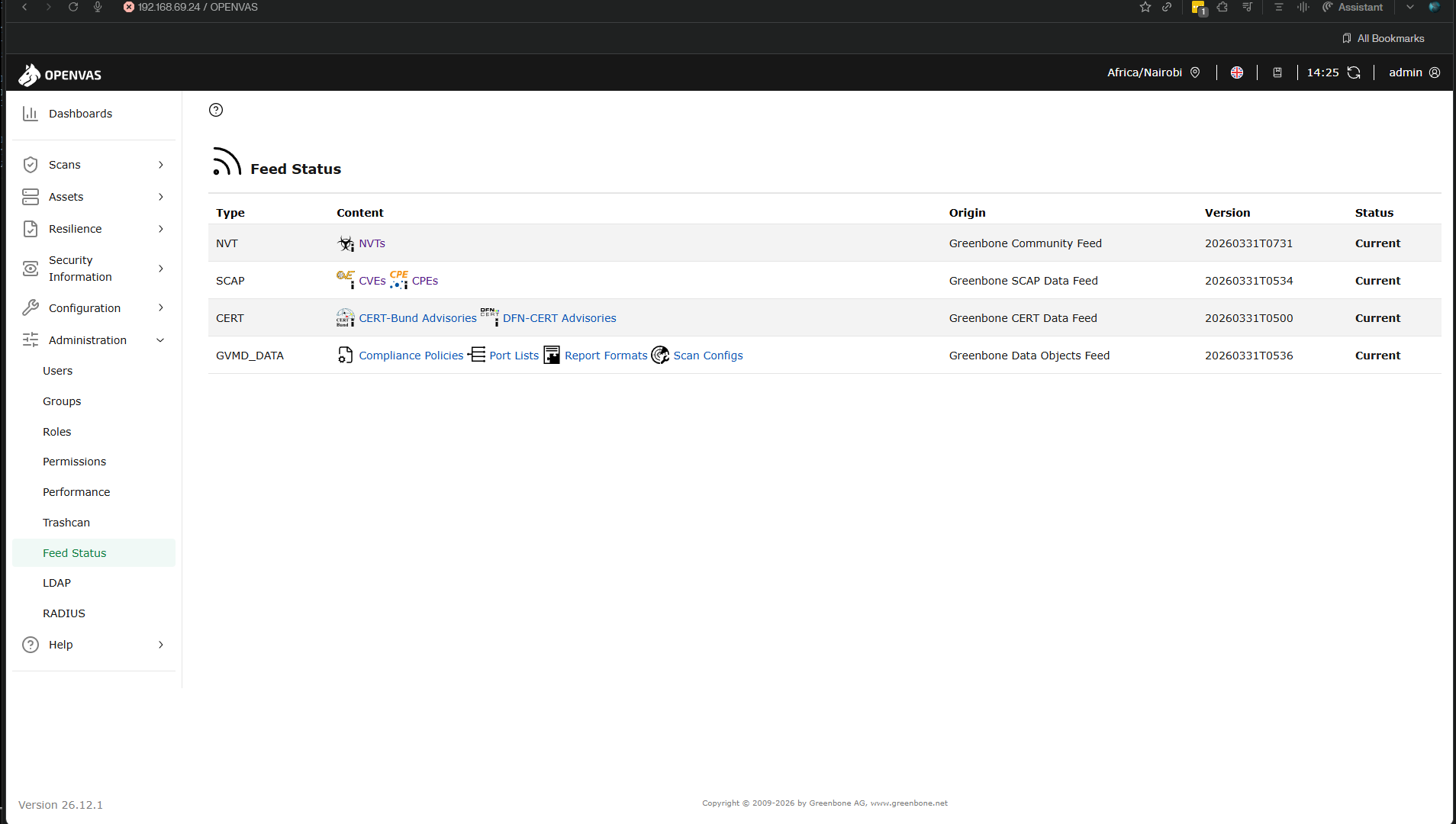
The sync did complete. I can see them though I see some are 18 days old. So I need to be running sync regularly?
Thank you for looking into this.
I did a greenbone-feed-sync yesterday and it completed. I ran it again just a few minutes ago and it completed in less than 5 minutes.
─# less /var/log/gvm/gvmd.log
md manage:   INFO:2026-03-31 16h20.09 utc:6371: Updating CVEs
md manage:   INFO:2026-03-31 16h20.10 utc:6371: Updating /var/lib/gvm/scap-data/nvdcve-2.0-2010.json.gz
md manage:   INFO:2026-03-31 16h23.37 utc:6371: Updating /var/lib/gvm/scap-data/nvdcve-2.0-1999.json.gz
md manage:   INFO:2026-03-31 16h23.40 utc:6371: Updating /var/lib/gvm/scap-data/nvdcve-2.0-2019.json.gz
md manage:   INFO:2026-03-31 16h25.00 utc:6371: Updating /var/lib/gvm/scap-data/nvdcve-2.0-2002.json.gz
md manage:   INFO:2026-03-31 16h25.07 utc:6371: Updating /var/lib/gvm/scap-data/nvdcve-2.0-2024.json.gz
md manage:   INFO:2026-03-31 16h28.39 utc:6371: Updating /var/lib/gvm/scap-data/nvdcve-2.0-2008.json.gz
md manage:   INFO:2026-03-31 16h29.07 utc:6371: Updating /var/lib/gvm/scap-data/nvdcve-2.0-2017.json.gz
md manage:   INFO:2026-03-31 16h30.18 utc:6371: Updating /var/lib/gvm/scap-data/nvdcve-2.0-2021.json.gz
md manage:   INFO:2026-03-31 16h32.46 utc:6371: Updating /var/lib/gvm/scap-data/nvdcve-2.0-2022.json.gz
md manage:   INFO:2026-03-31 16h36.06 utc:6371: Updating /var/lib/gvm/scap-data/nvdcve-2.0-2013.json.gz
md manage:   INFO:2026-03-31 16h37.18 utc:6371: Updating /var/lib/gvm/scap-data/nvdcve-2.0-2004.json.gz
md manage:   INFO:2026-03-31 16h37.31 utc:6371: Updating /var/lib/gvm/scap-data/nvdcve-2.0-2014.json.gz
md manage:   INFO:2026-03-31 16h38.17 utc:6371: Updating /var/lib/gvm/scap-data/nvdcve-2.0-2018.json.gz
md manage:   INFO:2026-03-31 16h39.23 utc:6371: Updating /var/lib/gvm/scap-data/nvdcve-2.0-2025.json.gz
md manage:   INFO:2026-03-31 16h42.22 utc:6371: Updating /var/lib/gvm/scap-data/nvdcve-2.0-2020.json.gz
md manage:   INFO:2026-03-31 16h44.19 utc:6371: Updating /var/lib/gvm/scap-data/nvdcve-2.0-2007.json.gz
md manage:   INFO:2026-03-31 16h44.43 utc:6371: Updating /var/lib/gvm/scap-data/nvdcve-2.0-2011.json.gz
md manage:   INFO:2026-03-31 16h45.41 utc:6371: Updating /var/lib/gvm/scap-data/nvdcve-2.0-2026.json.gz
md manage:   INFO:2026-03-31 16h46.29 utc:6371: Updating /var/lib/gvm/scap-data/nvdcve-2.0-2016.json.gz
md manage:   INFO:2026-03-31 16h47.36 utc:6371: Updating /var/lib/gvm/scap-data/nvdcve-2.0-2015.json.gz
md manage:   INFO:2026-03-31 16h48.28 utc:6371: Updating /var/lib/gvm/scap-data/nvdcve-2.0-2005.json.gz
md manage:   INFO:2026-03-31 16h48.48 utc:6371: Updating /var/lib/gvm/scap-data/nvdcve-2.0-2000.json.gz
md manage:   INFO:2026-03-31 16h48.54 utc:6371: Updating /var/lib/gvm/scap-data/nvdcve-2.0-2012.json.gz
md manage:   INFO:2026-03-31 16h49.57 utc:6371: Updating /var/lib/gvm/scap-data/nvdcve-2.0-2006.json.gz
md manage:   INFO:2026-03-31 16h50.19 utc:6371: Updating /var/lib/gvm/scap-data/nvdcve-2.0-2023.json.gz
md manage:   INFO:2026-03-31 16h53.50 utc:6371: Updating /var/lib/gvm/scap-data/nvdcve-2.0-2003.json.gz
md manage:   INFO:2026-03-31 16h54.00 utc:6371: Updating /var/lib/gvm/scap-data/nvdcve-2.0-2001.json.gz
md manage:   INFO:2026-03-31 16h54.07 utc:6371: Updating /var/lib/gvm/scap-data/nvdcve-2.0-2009.json.gz
md manage:   INFO:2026-03-31 16h54.51 utc:6371: update_epss_scores: EPSS scores file ‘/var/lib/gvm/scap-data/epss-scores-current.json’ not found
md manage:   INFO:2026-03-31 16h54.51 utc:6371: Updating CVSS scores and CVE counts for CPEs
md manage:   INFO:2026-03-31 17h43.00 utc:6371: Updating placeholder CPEs
md manage:   INFO:2026-03-31 17h43.11 utc:6371: Updating Max CVSS for DFN-CERT
md manage:   INFO:2026-03-31 17h43.19 utc:6371: Updating DFN-CERT CVSS max succeeded.
md manage:   INFO:2026-03-31 17h43.19 utc:6371: Updating Max CVSS for CERT-Bund
md manage:   INFO:2026-03-31 17h43.23 utc:6371: Updating CERT-Bund CVSS max succeeded.
md manage:   INFO:2026-03-31 17h43.27 utc:6371: update_scap_end: Updating SCAP info succeeded
md manage:   INFO:2026-03-31 17h43.28 utc:6366: Assigning EPSS scores to VTs
md   main:MESSAGE:2026-04-01 10h26.58 utc:1018:    Greenbone Vulnerability Manager version 26.19.0 (DB revision 272)
md   main:   INFO:2026-04-01 10h27.19 utc:1020: gvmd is ready to accept GMP connections
md manage:   INFO:2026-04-01 10h27.19 utc:1051: osp_scanner_feed_version: No feed version available yet. OSPd OpenVAS is still starting
md manage:   INFO:2026-04-01 10h27.29 utc:1063: osp_scanner_feed_version: No feed version available yet. OSPd OpenVAS is still starting
md manage:   INFO:2026-04-01 10h27.39 utc:1071: osp_scanner_feed_version: No feed version available yet. OSPd OpenVAS is still starting
md manage:   INFO:2026-04-01 10h27.49 utc:1078: osp_scanner_feed_version: No feed version available yet. OSPd OpenVAS is still starting
md manage:   INFO:2026-04-01 10h28.00 utc:1086: osp_scanner_feed_version: No feed version available yet. OSPd OpenVAS is still starting
md manage:   INFO:2026-04-01 10h28.10 utc:1093: osp_scanner_feed_version: No feed version available yet. OSPd OpenVAS is still starting
md manage:   INFO:2026-04-01 10h28.20 utc:1100: osp_scanner_feed_version: No feed version available yet. OSPd OpenVAS is still starting
md manage:   INFO:2026-04-01 10h28.30 utc:1108: osp_scanner_feed_version: No feed version available yet. OSPd OpenVAS is still starting
md manage:   INFO:2026-04-01 10h28.40 utc:1115: osp_scanner_feed_version: No feed version available yet. OSPd OpenVAS is still starting
md manage:   INFO:2026-04-01 10h28.50 utc:1122: osp_scanner_feed_version: No feed version available yet. OSPd OpenVAS is still starting
md manage:   INFO:2026-04-01 10h29.00 utc:1130: osp_scanner_feed_version: No feed version available yet. OSPd OpenVAS is still starting
md manage:   INFO:2026-04-01 10h29.10 utc:1137: osp_scanner_feed_version: No feed version available yet. OSPd OpenVAS is still starting
md manage:   INFO:2026-04-01 10h29.20 utc:1144: osp_scanner_feed_version: No feed version available yet. OSPd OpenVAS is still starting
md manage:   INFO:2026-04-01 10h29.30 utc:1152: osp_scanner_feed_version: No feed version available yet. OSPd OpenVAS is still starting
md manage:   INFO:2026-04-01 10h29.40 utc:1159: osp_scanner_feed_version: No feed version available yet. OSPd OpenVAS is still starting
md manage:   INFO:2026-04-01 10h29.50 utc:1166: osp_scanner_feed_version: No feed version available yet. OSPd OpenVAS is still starting
md manage:   INFO:2026-04-01 10h30.00 utc:1174: osp_scanner_feed_version: No feed version available yet. OSPd OpenVAS is still starting
md manage:   INFO:2026-04-01 10h30.11 utc:1181: osp_scanner_feed_version: No feed version available yet. OSPd OpenVAS is still starting
md manage:   INFO:2026-04-01 10h30.21 utc:1188: osp_scanner_feed_version: No feed version available yet. OSPd OpenVAS is still starting
md manage:   INFO:2026-04-01 10h30.31 utc:1196: osp_scanner_feed_version: No feed version available yet. OSPd OpenVAS is still starting
md manage:   INFO:2026-04-01 10h30.41 utc:1203: osp_scanner_feed_version: No feed version available yet. OSPd OpenVAS is still starting
md manage:   INFO:2026-04-01 10h30.51 utc:1210: osp_scanner_feed_version: No feed version available yet. OSPd OpenVAS is still starting
md manage:   INFO:2026-04-01 10h31.01 utc:1218: osp_scanner_feed_version: No feed version available yet. OSPd OpenVAS is still starting
event config:MESSAGE:2026-04-01 10h34.16 utc:1524: Config could not be created by admin
event config:MESSAGE:2026-04-01 10h34.37 utc:1553: Config could not be created by admin
event config:MESSAGE:2026-04-01 10h35.39 utc:1672: Config could not be created by admin
(END)
Yet, I still get that error when I try to configure a scan.
There must be a way to figure this out. The troubleshooting guide did not help me so far.
If it matters, I am accessing my OPENVAS VM remotely. I configured the systemd unit for gsad to start with ‘ExecStart=/usr/sbin/gsad --foreground --listen=0.0.0.0 --port=443’. Might that cause some issue? If so, I can let it run as factory default and have Nginx proxy to port 9392.
Thank you in advance.
PS: Although I still need to do lots of RTFM (I am completely new to OpenVAS), do I need to run greenbone-feed-sync on a weekly basis or monthly basis? What’s the recommended way?
I ended up blowing away everything and started afresh and now I even can see some default scan configs, something that wasn’t available previously. I believe my previous install was b0rk3n!