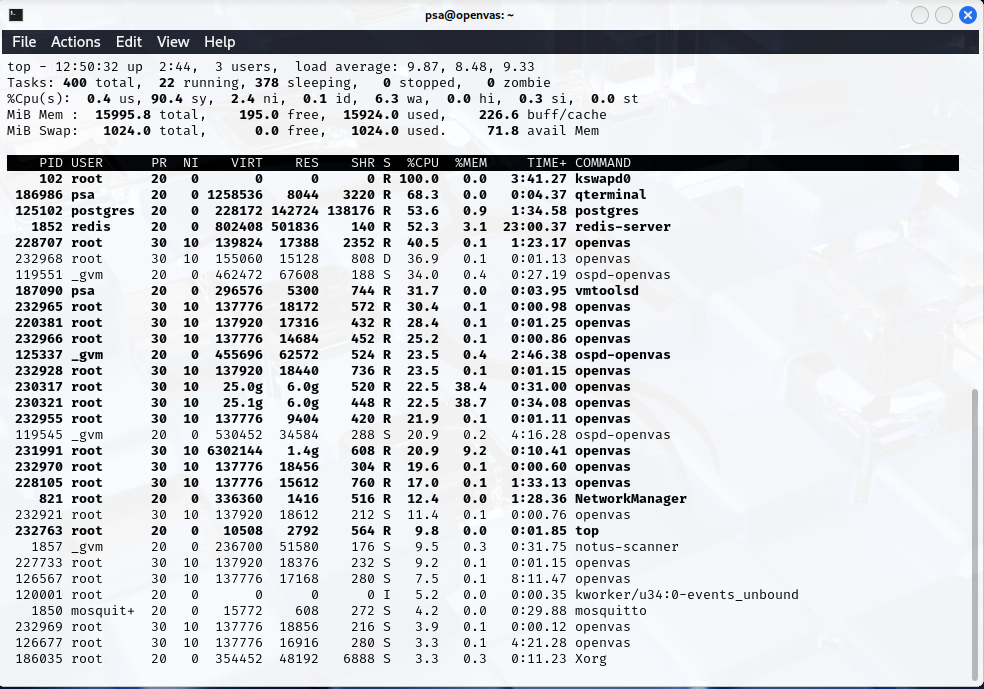
Last two weeks all my scans didn’t finish. I run Greenbone Community Edition 25.04.0 on Kali Linux. Just to check tried to use official Virtual Box image yesterday and got the same result. The simptoms are: at 88-96% of each task a couple of “openvas” processes consume all the RAM and swap. After that the process kswapd0 consumes all the CPU resources and the VM (ESXi and Virtual Box are used) stops responding at all. It takes about 5-10 minutes before “unfreez” and the scans become interrupted after that.
My config is: Xeon CPU E5-4650 v2 (tried from 8 to 12 kernels, no difference), 16Gb RAM, SSD drive. Checked with scan from 1 to 15 targets and from 2 to 4 concurrently executed NVTs - no difference. All feeds are current. Here is the gvmd.log:
md manage:WARNING:2025-11-26 09h53.50 utc:233274: osp_scanner_feed_version: failed to connect to /run/ospd/ospd.sock
md manage:WARNING:2025-11-26 09h53.53 utc:125101: Could not connect to Scanner at /run/ospd/ospd.sock
md manage:WARNING:2025-11-26 09h53.58 utc:125101: Could not connect to Scanner at /run/ospd/ospd.sock
md manage:WARNING:2025-11-26 09h53.58 utc:125101: Connection lost with the scanner at /run/ospd/ospd.sock. Trying again in 1 second.
md manage:WARNING:2025-11-26 09h53.59 utc:125101: Could not connect to Scanner at /run/ospd/ospd.sock
md manage:WARNING:2025-11-26 09h53.59 utc:125101: Connection lost with the scanner at /run/ospd/ospd.sock. Trying again in 1 second.
md manage:WARNING:2025-11-26 09h54.00 utc:233300: osp_scanner_feed_version: failed to connect to /run/ospd/ospd.sock
md manage:WARNING:2025-11-26 09h54.00 utc:125101: Could not connect to Scanner at /run/ospd/ospd.sock
md manage:WARNING:2025-11-26 09h54.00 utc:125101: Connection lost with the scanner at /run/ospd/ospd.sock. Trying again in 1 second.
md manage:WARNING:2025-11-26 09h54.01 utc:125101: Could not connect to Scanner at /run/ospd/ospd.sock
md manage:WARNING:2025-11-26 09h54.01 utc:125101: Could not connect to Scanner at /run/ospd/ospd.sock
event task:MESSAGE:2025-11-26 09h54.01 utc:125101: Status of task Linuxes Sunday at 9 Clone 2 (983f798f-105a-465a-9ae0-fc5f59cda40c) has changed to Stopped
md manage:WARNING:2025-11-26 09h54.05 utc:233316: nvts_feed_info_internal: failed to connect to /run/ospd/ospd.sock
md manage:WARNING:2025-11-26 09h54.05 utc:233329: nvts_feed_info_internal: failed to connect to /run/ospd/ospd.sock
md manage:WARNING:2025-11-26 09h54.17 utc:233409: osp_scanner_feed_version: failed to connect to /run/ospd/ospd.sock
md manage:WARNING:2025-11-26 09h54.27 utc:233411: osp_scanner_feed_version: failed to connect to /run/ospd/ospd.sock
md manage:WARNING:2025-11-26 09h54.40 utc:233429: osp_scanner_feed_version: failed to connect to /run/ospd/ospd.sock
md manage:   INFO:2025-11-26 09h54.50 utc:233448: osp_scanner_feed_version: No feed version available yet. OSPd OpenVAS is still starting
md manage:   INFO:2025-11-26 09h55.00 utc:233458: osp_scanner_feed_version: No feed version available yet. OSPd OpenVAS is still starting
md manage:   INFO:2025-11-26 09h55.10 utc:233600: osp_scanner_feed_version: No feed version available yet. OSPd OpenVAS is still starting
Here is the ospd-openvas.log:
OSPD\[1869\] 2025-11-26 07:20:29,514: INFO: (ospd.ospd) Starting scan f1e2bb3e-78c3-45b0-bad5-c830403210ab.
OSPD\[1869\] 2025-11-26 07:26:14,892: WARNING: (ospd_openvas.daemon) Invalid VT oid  for a result
OSPD\[1869\] 2025-11-26 07:52:54,443: INFO: (ospd.ospd) f1e2bb3e-78c3-45b0-bad5-c830403210ab: Stopping Scan with the PID 3604.
OSPD\[1869\] 2025-11-26 07:52:54,482: INFO: (ospd.ospd) f1e2bb3e-78c3-45b0-bad5-c830403210ab: Scan stopped.
OSPD\[1869\] 2025-11-26 07:52:54,487: INFO: (ospd.main) Shutting-down server …
OSPD\[1869\] 2025-11-26 07:52:54,299: ERROR: (ospd.ospd) f1e2bb3e-78c3-45b0-bad5-c830403210ab: Exception Timeout reading from socket while scanning
Traceback (most recent call last):
File “/usr/lib/python3/dist-packages/redis/\_parsers/socket.py”, line 65, in \_read_from_socket
data = self.\_sock.recv(socket_read_size)
^^^^^^^^^^^^^^^^^^^^^^^^^^^^^^^^^
TimeoutError: timed out

During handling of the above exception, another exception occurred:

Traceback (most recent call last):
File “/usr/lib/python3/dist-packages/ospd/ospd.py”, line 582, in start_scan
self.exec_scan(scan_id)
File “/usr/lib/python3/dist-packages/ospd_openvas/daemon.py”, line 1216, in exec_scan
got_results = self.report_openvas_results(kbdb, scan_id)
^^^^^^^^^^^^^^^^^^^^^^^^^^^^^^^^^^^^^^^^^^
File “/usr/lib/python3/dist-packages/ospd_openvas/daemon.py”, line 841, in report_openvas_results
return self.report_results(results, scan_id)
^^^^^^^^^^^^^^^^^^^^^^^^^^^^^^^^^^^^^
File “/usr/lib/python3/dist-packages/ospd_openvas/daemon.py”, line 895, in report_results
vt_aux = vthelper.get_single_vt(roid)
^^^^^^^^^^^^^^^^^^^^^^^^^^^^
File “/usr/lib/python3/dist-packages/ospd_openvas/vthelper.py”, line 33, in get_single_vt
custom = self.nvti.get_nvt_metadata(vt_id)
^^^^^^^^^^^^^^^^^^^^^^^^^^^^^^^^^
File “/usr/lib/python3/dist-packages/ospd_openvas/nvticache.py”, line 155, in get_nvt_metadata
resp = OpenvasDB.get_list_item(
^^^^^^^^^^^^^^^^^^^^^^^^
File “/usr/lib/python3/dist-packages/ospd_openvas/db.py”, line 180, in get_list_item
return ctx.lrange(name, start, end)
^^^^^^^^^^^^^^^^^^^^^^^^^^^^
File “/usr/lib/python3/dist-packages/redis/commands/core.py”, line 2718, in lrange
return self.execute_command(“LRANGE”, name, start, end, keys=\[name\])
^^^^^^^^^^^^^^^^^^^^^^^^^^^^^^^^^^^^^^^^^^^^^^^^^^^^^^^^^^^^^
File “/usr/lib/python3/dist-packages/redis/client.py”, line 621, in execute_command
return self.\_execute_command(\*args, \*\*options)
^^^^^^^^^^^^^^^^^^^^^^^^^^^^^^^^^^^^^^^
File “/usr/lib/python3/dist-packages/redis/client.py”, line 632, in \_execute_command
return conn.retry.call_with_retry(
^^^^^^^^^^^^^^^^^^^^^^^^^^^
File “/usr/lib/python3/dist-packages/redis/retry.py”, line 110, in call_with_retry
raise error
File “/usr/lib/python3/dist-packages/redis/retry.py”, line 105, in call_with_retry
return do()
^^^^
File “/usr/lib/python3/dist-packages/redis/client.py”, line 633, in
lambda: self.\_send_command_parse_response(
^^^^^^^^^^^^^^^^^^^^^^^^^^^^^^^^^^
File “/usr/lib/python3/dist-packages/redis/client.py”, line 604, in \_send_command_parse_response
return self.parse_response(conn, command_name, \*\*options)
^^^^^^^^^^^^^^^^^^^^^^^^^^^^^^^^^^^^^^^^^^^^^^^^^^
File “/usr/lib/python3/dist-packages/redis/client.py”, line 651, in parse_response
response = connection.read_response()
^^^^^^^^^^^^^^^^^^^^^^^^^^
File “/usr/lib/python3/dist-packages/redis/connection.py”, line 650, in read_response
response = self.\_parser.read_response(disable_decoding=disable_decoding)
^^^^^^^^^^^^^^^^^^^^^^^^^^^^^^^^^^^^^^^^^^^^^^^^^^^^^^^^^^^^^
File “/usr/lib/python3/dist-packages/redis/\_parsers/resp2.py”, line 15, in read_response
result = self.\_read_response(disable_decoding=disable_decoding)
^^^^^^^^^^^^^^^^^^^^^^^^^^^^^^^^^^^^^^^^^^^^^^^^^^^^^^
File “/usr/lib/python3/dist-packages/redis/\_parsers/resp2.py”, line 25, in \_read_response
raw = self.\_buffer.readline()
^^^^^^^^^^^^^^^^^^^^^^^
File “/usr/lib/python3/dist-packages/redis/\_parsers/socket.py”, line 115, in readline
self.\_read_from_socket()
File “/usr/lib/python3/dist-packages/redis/\_parsers/socket.py”, line 78, in \_read_from_socket
raise TimeoutError(“Timeout reading from socket”)
redis.exceptions.TimeoutError: Timeout reading from socket
Here is the “top” example:
Tasks: 397 total,  12 running, 385 sleeping,   0 stopped,   0 zombie
%Cpu0  :  3.6 us, 36.1 sy, 53.0 ni,  7.3 id,  0.0 wa,  0.0 hi,  0.0 si,  0.0 st
%Cpu1  : 22.9 us, 42.5 sy, 31.9 ni,  2.7 id,  0.0 wa,  0.0 hi,  0.0 si,  0.0 st
%Cpu2  : 16.1 us, 45.5 sy, 35.1 ni,  3.0 id,  0.0 wa,  0.0 hi,  0.3 si,  0.0 st
%Cpu3  :  9.3 us, 44.3 sy, 41.0 ni,  5.3 id,  0.0 wa,  0.0 hi,  0.0 si,  0.0 st
%Cpu4  : 12.6 us, 48.0 sy, 37.7 ni,  1.3 id,  0.0 wa,  0.0 hi,  0.3 si,  0.0 st
%Cpu5  : 33.9 us, 29.9 sy, 29.2 ni,  6.7 id,  0.3 wa,  0.0 hi,  0.0 si,  0.0 st
%Cpu6  : 21.8 us, 37.6 sy, 30.5 ni,  9.4 id,  0.3 wa,  0.0 hi,  0.3 si,  0.0 st
%Cpu7  : 14.0 us, 45.2 sy, 30.6 ni,  9.3 id,  0.0 wa,  0.0 hi,  1.0 si,  0.0 st
MiB Mem :  15995.8 total,    193.2 free,  13428.5 used,   2852.4 buff/cache
MiB Swap:   1024.0 total,    602.2 free,    421.8 used.   2567.2 avail Mem

PID USER      PR  NI    VIRT    RES    SHR S  %CPU  %MEM     TIME+ COMMAND
230901 root      30  10  139824  22736   4792 R  75.9   0.1   0:22.10 openvas
228707 root      30  10  139824  24428   5064 R  75.6   0.1   1:10.81 openvas
228105 root      30  10  139824  27196   9068 R  71.6   0.2   1:20.91 openvas
**230321 root      30  10   20.3g  15.6g  10.7g R  59.1  99.9   0:22.70 openvas**
**230317 root      30  10   20.5g  15.8g  10.8g R  56.4 101.0   0:22.91 openvas**
125102 postgres  20   0  228172 158372 152044 R  54.1   1.0   1:27.23 postgres
231991 root      30  10 2134896   1.5g   1.0g R  52.1   9.6   0:02.41 openvas
1852 redis     20   0  802408 647100   3472 S  29.0   4.0  22:50.61 redis-server
125337 \_gvm      20   0  456720  52416   5952 R  28.1   0.3   2:41.40 ospd-openvas
102 root      20   0       0      0      0 S  25.7   0.0   3:25.93 kswapd0
119551 \_gvm      20   0  459400  64316   6248 S  24.1   0.4   0:19.53 ospd-openvas
125101 \_gvm      20   0  556660 302400   6532 S  12.2   1.8   0:11.98 gvmd
119545 \_gvm      20   0  530452  52012   7684 S   5.9   0.3   4:14.58 ospd-openvas
126562 root      30  10  137776  24852   6352 S   5.3   0.2   7:25.80 openvas
86 root      20   0       0      0      0 S   3.0   0.0   0:01.75 kcompactd0
232172 root      30  10  137776  20928   2592 S   2.0   0.1   0:00.06 openvas
126567 root      30  10  137776  24848   6356 R   1.0   0.2   8:06.40 openvas
232118 root      30  10  137776  20700   2680 S   1.0   0.1   0:00.03 openvas
4603 root      20   0   11220   4876   2016 R   0.7   0.0   2:24.00 top
126566 root      30  10  137776  24188   6356 S   0.7   0.1   2:52.48 openvas
178409 root      30  10  137920  30120   9192 S   0.7   0.2   0:00.97 openvas
186035 root      20   0  354452 115992  66620 S   0.7   0.7   0:11.10 Xorg